Seller University
Be a part of the evolving curation of the best US products, barrier-free shopping experiences, and market-leading shipping speed. Learn how to simplify your onboarding process and execute with efficiency at Coupang’s Seller University. Optimize your business today!
If you have any lingering questions or if you want more information on the different integration models, please email globalservices@coupang.com.

The Science of Selling, Simplified.
Success shouldn’t be a guessing game. Our curriculum breaks down complex marketplace dynamics into actionable strategies you can implement today. From detail page optimization to inventory management, we provide the blueprints you need to transition from a casual seller to a dominant brand.
Sell Smarter: Stop working harder and start leveraging our tools to their full potential. Our quick-start guides help you shave hours off your workflow so you can focus on what matters: your products.
Coupang Seller University Resources
Starting with Coupang
Register as a Seller
Are you wondering how to apply to be a part of the Coupang Global Fulfillment program? Look no further! Please follow the steps below to complete the application process.
- Step 1: Email Coupang Global team at us_cgf_business@coupang.com with your interest in applying for CGF. A team member will reply with direction on next steps.
- Step 2: Complete all online forms and contracts, including providing required business documentation (see below).
- Step 3: If application is approved, an Account Manager will reach out to you with next steps.
- Step 4: Once CGF permission is granted to your account, you will be ready to list your CGF-approved products!
Information needed for full account and listing set up:
- COI (Certificate of Insurance) with Worldwide Coverage $1M per occurance, $2M in aggregate
- Business license documentation (EIN Confirmation Letter or Tax Return)
- Proof of business ownership (IRS tax forms or Articles of Incorporation)
- Bank Account details
- Proof of ID (Passport or Driver License – both front & back)
Preparing Your Products for the Fulfillment Center
Coupang requires a specific process for preparing your products to be sent to our fulfillment center.
- Each individual product should be labeled with a C-SKU, also known as Coupang SKU or CGF Barcode. The label should cover the original UPC barcode if the label is placed directly on the product. Otherwise, the label can be placed on any outer box or poly packaging.
- Bundled items, that are meant to be sold as a “hard bundle”, should have stickers labeled “Do Not Separate”.
Packing Guidelines for CGF Products
Packing Guidelines
- When packing your products and sending them to the Riverside Fulfillment Center, make sure to follow the following guidelines:
- Boxes should be packed to protect items during transit.
- Damaged items will not be accepted and may result in extra fees to dispose of them properly.
- Each box should be 1 case pack of a single item. Do NOT mix multiple SKUs in the same case pack.
- If items are perishable, all items in a specific box should have the same expiration date.
- The expiration date MUST be visible on the box.
- At this time, all items are subject to Coupang overbox or envelopes. Shipping items in their own container (SIOC) is not yet available for CGF.
Parcel and Case Pack Guidelines
- Each parcel in a shipment should have the shipping label visible on the outside of the box.
- Each inbound shipment should have the manifest or packing list attached to 1 box in the shipment.
Pallet Guidelines
- Pallets must be shrink-wrapped in a clear, transparent shrink-wrap. The shrink-wrap should be tied or attached to the pallet ensuring that the first wrap covers the pallet and base cartons. Pallets should be wrapped at a minimum of 5 times ensuring the pallet doesn’t break apart in transit.
- Do not overhang the pallet.
- Pallets must be of at least Grade B, GMA 4-way type.
- No missing or broken boards on top or bottom.
- No cracks on top or bottom boards greater than 1/8” wide and 12” in length.
- Each box in a pallet should have the relevant shipping label attached.
- Each pallet should contain a shipment manifest or packing list.
Product Registration Rules and Policies
Restricted Products
- Alcohol
- Cigarettes
- Drugs (CBD products, medicine, medical devices, and quasi-drugs)
- Examples of “Quasi Drugs” include menstrual products, bandages, antiperspirants, toothpaste, energy drinks, prescription products
- Products that violate copyright, trademark, or intellectual property laws.
- Please visit the link here for a more comprehensive look at our IP Policy.
- Self-defense products (electroshock weapons, compressed gas sprayer containing tear gas, etc.)
- Media products harmful to youth
- Child products that are not edible, used for eating, or hygiene items (products used by or for children aged under 14, toys, clothes, etc.)
- Supplements that include bovine, N-Acetyl-Cysteine (NAC), L-Citrulline, Echinacea, Hemp, Melatonin, Pygeum, CMIT/MIT, Slippery elm, Shilajit, or any other substance or product restricted by the Korea MFDS.
*For a more comprehensive look at our product restriction policy, please visit the link here. Korea MFDS maintains a list of restricted ingredients that are forbidden from import. This list is a summary and is subject to change.
Important Registration Rules
- Regardless of the available category, the sale of products explicitly targeting children under 13 is prohibited in all categories for CGF.
- When selecting category, please make sure that it matches the product sold. Seller has responsibility and obligation to correctly select and register the product category, and strictly comply with laws and regulations of relevant products.
- If category does not match the product being sold, product will also fail to pass the audit. If product is rejected due to a wrong category, seller needs to select correct category and submit audit application again.
- According to Coupang policy and regulations, the product will be removed from sale if its registered category does not match. This will happen even if the product is already on sale. Once a product is removed, Seller cannot re-list it and must register the product again.
- When registering product, please note the following when filling in the brand and manufacturer information.
- “No Brand” is a brand owned by eMart Group of Korea. Please do not use the word “No Brand” in any product information, including product title, detail page and brand name. If “No Brand” is filled in, product will fail to pass the audit.
- When filling in the brand, if it is a product without specific brand, please check “without brand (or homemade)”.
- When filling in the manufacturer, if the brand and manufacturer cannot be verified, please leave the field blank and do not fill in any content.
Shelf Life Guidelines
- For all perishable items, CGF products require a 90-day minimum shelf life. A product’s minimum shelf life is specified during the listing process. If the product’s remaining shelf life is less than the minimum specified shelf life, then the product will be suspended and disposed of at the seller’s expense.
Inbound Limit
- CGF products can only be registered if they meet the following conditions:
- Product dimensions must not exceed 12 inches x 12 inches x 15 inches
- Weight of each item (SKU) must not exceed 50lbs
- Please comply with the following warehousing regulations when shipping. In case of any violation, the warehouse will reject the inbound application and the product will not be able to be inbounded.
- Items need to be inbounded as full case packs.
- One expiration date is needed per case pack, and each box needs to have the same expiration date.
- Each box needs a shipping label, and at least one box needs to have the manifest. Both the shipping label and manifest can be printed off of Wing.
- If using pallets, each pallet must have the shipment label, state PO #ID, state PO #, company name, and pallet count (e.g. 1 of 4, 2 of 4, etc.).
- Each pallet must be shrink-wrapped in a clear, transparent shrink-wrap.
- Coupang Global, LLC reserves the right to refuse pallets without shrink wrap. The shrink-wrap should be tied or attached to the pallet, ensuring that the first wrap covers the pallet and base cartons. Pallets should be wrapped at a minimum of 5 times, ensuring the pallet doesn’t break apart in transit.
- If multiple SKUs are shipped in one container, be sure to separate the different SKUs clearly. If more than two SKUs are shipped in a container, each SKU should be packed separately in a small carton or PVC bag for physical isolation, so that the warehouse can directly identify all of the SKUs in the same container.
- If more than two SKUs are shipped in same batch of inbound containers, be sure to keep the product barcode clear. If physical barcode does not match system SKU information, the warehouse may not be able to identify the product.
- All items need to be labeled before they are inbound with a CGF barcode, labeled with the Coupang SKU (or CSKU) on the outer box, outer polybag, or covering the existing UPC. The CSKU can be printed off in Wing.
Understand the Product Detail Page
The product detail page is where customers find all relevant information about an item.
- Title
- 100 characters max, capitalize the first letter of every word
Images - 500 x 500 pixels recommended to increase listing quality
Product Options - Such as different colors, scents, flavors, count, or sizes
- Bullet points
- Short, descriptive sentences highlighting key features and benefits
- Detailed Description
- Coupang recommends using images to make your products stand out. You can enter just images, or both images and text in product details
- Width: 780px recommended, min 300px and max 3,000px
- Length: max 30,000px
- Keywords improve the chances that people will find your listing
Products offered for sale in WING and on Coupang must comply with all Korean laws and regulations, as well as Coupang policies. Before you start the listing process, make sure you understand our Product safety and Restricted products policies. - All sellers can create product listings one at a time. Professional sellers can also create product listings in bulk.
Listing Products
Please watch the video below to see an overview of the Coupang 2P Listing Process:
Pricing Products
- Many tools are available on WING for sellers to manage their sales. To gain insight into your sales and pricing, click on “Manage Prices.” Here, sellers can see which products are item winners, their product prices, recommended prices, sell prices in the last seven days, and much more.
- Sellers are first prompted to input their product prices during the listing process. To set your prices in the Product Options section in Wing:
- To set your prices:
- Enter number and quantity options for your products
- Enter the sales price per product option (you may need to scroll right).
- Sales price KRW is required to list
- Original price (KRW) is optional
- A sales price is required for every product option
- If you want to enable automatic pricing, you first have to enter the Sales price (KRW) before being able to set and adjust auto pricing.
- If you are setting up automatic pricing, check the Recommended Coupang Automatic Pricing numbers and adjust to your preference. You can adjust both your start and max prices for each product and product option.
- Sellers can set their price in bulk for all product options by clicking on “Enter price in bulk”. This will set the same price for every product option of the product they are listing.
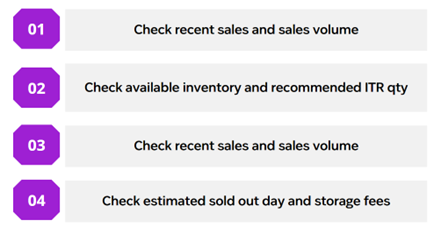
- You can check the sales status of products registered on CGF in our WING Seller Tool under Coupang Global Fulfillment > Manage Inventory.
- CGF provides inventory information to help sellers make decisions.
Fulfilling Customer Orders
More information on how to fulfill customer orders will be coming soon!
Growing with Coupang
Promoting and Advertising
Want to boost your sales? Set up a discount coupon on Coupang! At Coupang, there are two types of coupons – instant and downloadable. Instant coupons apply directly to the products. Downloadable coupons, on the other hand, apply when the total order amount reaches the amount set by the seller. Customers may download the coupons themselves.
Instant Coupons:
- Instant coupons enable sellers to directly apply discount coupons to the products they want. The monthly budget is set without a contract, and costs are deducted in settlement. You can freely set the budget, product, and period you want. “Instant discount-applied prices” are exposed to customers, which can greatly impacts sale.
Downloadable Coupons:
- A downloadable coupon can be used when the total order amount of coupon-applied items reaches the amount set by the seller. Customers can download the coupon themselves. “Coupon discount” will be displayed for products that have the downloadable coupon attached. On the product detail page, a banner that directs users to a page that shows only coupon discount products will be created.
Coupang Ads
When you are ready to invest in marketing, there are 3 main types of onsite marketing available for CGF Sellers: Coupang Ads, Promotions, and My Shop.
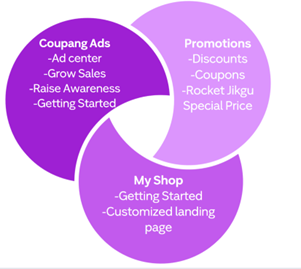
- When you select a Campaign goal of “Grow sales”, this will lead you to create a Product Ad (PA) campaign. This means that the ad placements lead directly to your individual product detail pages.
- Product Ads are ads that show your products to customers searching for your item with a high likelihood of purchasing. PA are shown in the search results, product information pages, and main browse pages.
- Another great thing about Coupang Product Ads is that they are charged on a Pay Per Click (PPC) basis meaning you’re only charged when someone clicks on your ad.
- Some tips for Product Ads:
- You should allocate a daily budget of at least 30,000 KRW, otherwise your ad may run out of funds and lose out on potential impressions.
- Each campaign can contain up to 500 items.
- Don’t run multiple Product Ad campaigns with the same product.
- Set an ambitious but appropriate return on advertising spend (ROAS).
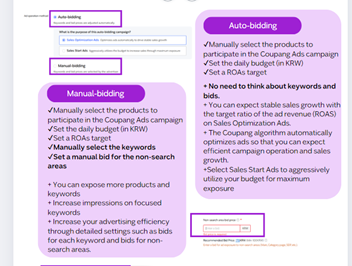
- There are 2 main ad types for Product Ads: Manual Product Setting and AI Smart Ads.
- If you choose Manual Product Setting you will then be able to select between Auto-bidding or Manual-bidding. Choose an ad type according to your situation and purpose.
MyShop
Myshop Ads Management is a seller-exclusive page where you can collect your products and showcase them together. It can be used as a landing page for New Customer Acquisition ads, Raise Awareness ads or display ads, and you can showcase a variety of products together to customers who enter the page through ads.
To start with MyShop, sellers will first have to submit an application. Once the application is approved, sellers will have access to the MyShop basic settings.
Sellers will have the opportunity to input their MyShop name, information, and introduction. Please note that you will only be able to edit your MyShop name once.
Afterwards, make sure to upload two top images: one optimized for PC and one optimized for mobile. Once you have customized your MyShop URL, you will be able to request approval for registration.
Get Product Reviews
After a customer buys a product, they can leave a public product review, a seller-feedback rating, or both. Try these tips to improve your chances of getting positive reviews and ratings:
- Accurately represent all of your products on your product detail pages.
- Pack your products according to our guidelines to help prevent damage during delivery.
- Respond to customer messages within 24 hours.
- Provide valid tracking numbers so customers can track their orders.
Seller Guides
Coupang Global Services provides multiple guides for our sellers to leverage. For quick links to download these comprehensive guides, please take a look below:
- Seller Overview Guide: Coming Soon!
- Listing Guide: Coming Soon!
- Routing Guide: Coming Soon!
- Marketing Guide: Coming Soon!
Learn the Key Terms
Awareness, Consideration, Conversion, and Loyalty: “Awareness,” “consideration,” “conversion,” and “loyalty” refer to different stages in the customer journey.
- Awareness: Customers recognize your brand and products.
- Consideration: Customers are deciding if your brand or products meets their needs.
- Conversion: Customers purchase your products.
- Loyalty: Customers continue purchasing your brand and products.
A+ Content
- Increase sales with better listings
- Showcase your products and tell your brand’s story by adding video, enhanced images, product-comparison charts, and other features to your product detail pages.
More information on A+ content coming soon!
Advertise
Boost visibility and increase sales with Coupang Ads
- Our advertising tools can help you reach more customers and grow your brand. Campaigns are easy to set up—and you can set your own bids and budgets.
- Why Coupang Ads?
- Get discovered
- Advertising provides a visibility boost for your products and brand. Coupang Ads campaigns appear in highly visible placements.
- Increase sales
- Many shoppers come to Coupang ready to buy. Coupang Ads can help you reach customers who are looking for products like yours.
- Control costs
- Coupang Ads reports track ad spend and performance, so you can learn what’s working, fine-tune your campaigns, and optimize your advertising budget.
Video Guides
Video Tutorials
TO BE COMPLETED